> ## Documentation Index
> Fetch the complete documentation index at: https://docs.gravixlayer.ai/llms.txt
> Use this file to discover all available pages before exploring further.
# Web Terminal
> Access your agent runtime directly from the Gravix Layer Platform
You can connect to any running agent runtime through a web-based terminal in the [Gravix Layer Platform](https://app.gravixlayer.ai), without using SSH keys or local tooling.
## How to Access
1. Go to [app.gravixlayer.ai](https://app.gravixlayer.ai) and navigate to **Agent Runtimes**.
2. Find your running runtime in the list.
3. Click the **terminal icon** in the **Actions** column.
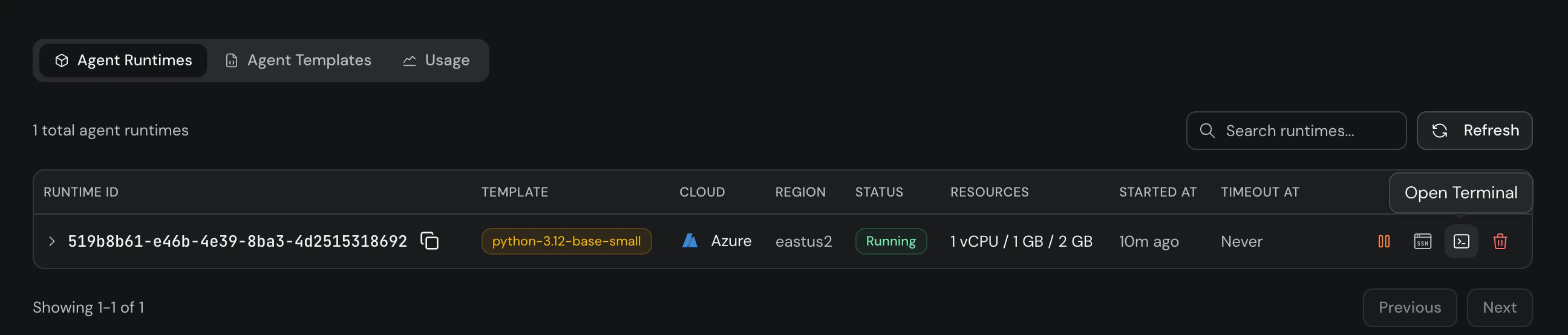 A browser-based terminal session opens with full shell access to your runtime. You can run commands, inspect files, debug issues, and install packages — just like a local terminal.
## When to Use
* **Quick debugging**: Inspect logs, check running processes, or verify file state without setting up SSH.
* **Prototyping**: Test commands interactively before scripting them with `run_cmd`.
* **Team access**: Share platform access with teammates — no SSH key distribution needed.
The web terminal requires the runtime to be in **Running** status. If the runtime is stopped or terminated, start or create a new one first.
A browser-based terminal session opens with full shell access to your runtime. You can run commands, inspect files, debug issues, and install packages — just like a local terminal.
## When to Use
* **Quick debugging**: Inspect logs, check running processes, or verify file state without setting up SSH.
* **Prototyping**: Test commands interactively before scripting them with `run_cmd`.
* **Team access**: Share platform access with teammates — no SSH key distribution needed.
The web terminal requires the runtime to be in **Running** status. If the runtime is stopped or terminated, start or create a new one first.